
No MoreApp account yet? Sign up here.
1. Go to the Submissions tab
This is the page where all the submissions of your form are listed. You get here by opening your form and clicking on the Submissions tab.
2. Delete a submission
To delete the submission, under the Actions column, click on the arrow to open the dropdown. Then, click on Delete.
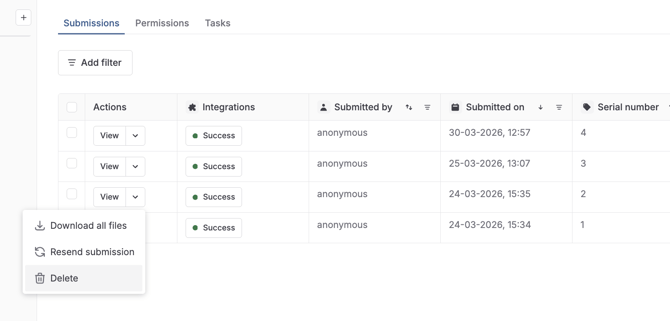
You will get a pop-up that asks you to confirm the action. Write the name of the form and click on Delete. After clicking on delete, the action cannot be undone.
3. Congratulations!
You have successfully deleted one of the submissions of your form. If you want to delete multiple submissions, you can select all the desired submissions and click on Delete in the lower right corner of the submissions table.
Want to stay up to date with our latest tutorials? Go to YouTube and hit the Subscribe button!