
No MoreApp account yet? Sign up here.
Why an Account Owner?
So we know who to contact for updates regarding:
Pricing
-
Special offers
-
Out of submission emails
Legal
-
Legal agreements
-
Delete account requests
Billing
-
Unpaid invoices
-
Adjust Billing information
Product updates
-
Expected changes and updates for this account.
An Account Owner can:
-
Manage the account
-
Manage all Billing enquiries
-
Assign the role of Account Owner to another user
The Account Owner can be found in the Users tab. In the top-right corner, you will see who the Account Owner is.
Important note: There is only one Account Owner per account!
How to make another user the Account Owner?
Only the Account Owner can transfer its ownership to another user.
Note: The previous Account Owner will lose its rights as an Account Owner immediately.
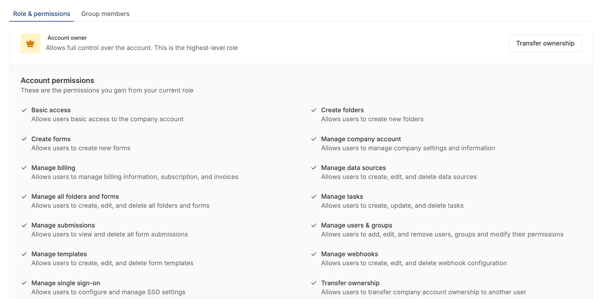
Go to the Users tab, click on your user (the current Account Owner) to open the details.
Once in the Role & permissions tab, you will see the Account Owner banner. Click on Transfer ownership.
Select the new Account Owner by using the dropdown. Then, click on Transfer.
Note: The old and the new Account Owners will get an email about the transfer of ownership.
The previous Account Owner automatically gets the role: Account Administrator. If you want to adjust this, select another role for the previous Account Owner.
If you need help with transferring the ownership, please send us an email.
Want to stay up to date with our latest tutorials? Go to YouTube and hit the Subscribe button!