
No MoreApp account yet? Sign up here.
1. Add a new Subform
There are two different ways to create a new Subform:
-
Subform field: Go to the Form Builder and add a new Subform field to your form. When configuring the field, click on + New. Add the desired fields inside the Subform. When done, go back to the main form.
-
Subforms tab: Go to the Subforms tab on the menu and click on the + sign to create a new Subform. Give a name to the Subform and add the desired fields to the Subform.
Note: For more details on working with Subforms, check this Help Center post.
2. Use an existing Subform
To use an existing Subform in a new Subform field, add a Subform field to the form. Now, click on the dropdown and select the Subform you want.
Note: You can only select Subforms created within the same form.
For every new Subform field, you need to configure the properties such as the Label and the Subform summary.
3. Manage Subforms
Go to the left side menu and click on the Subforms tab. Here you can find an overview of all the existing Subforms for a specific form and for how many fields each Subform is used.
By clicking the three dots, you can rename, duplicate or delete the Subforms.
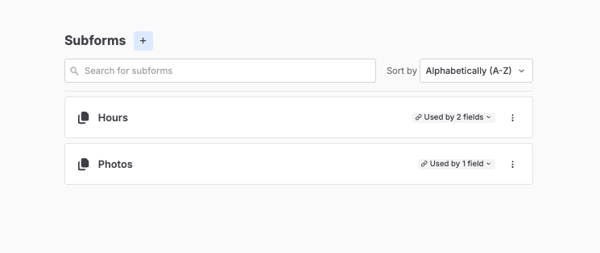
Note: If you delete a Subform from the list, the Subform fields of the form will be empty and will show an error.
4. Changes in Subforms
If you make any changes to one subform that is used in more than one field of the form, the changes will be applied in all the fields.
Notes:
-
The code view for each Subform’s PDF will be the same. Changes will also be applied there.
-
The Label, Add button text, Subform summary, Minimum and Maximum will not be changed.
Do you want to be the first one to see our latest tutorials? Go to YouTube and hit the Subscribe button!